The cost shows up late.
Back pain, shoulder disorders and repetitive strain injuries drive lost workdays, restricted duty, turnover and compensation costs across manufacturing.

Ergomatic is AI ergonomic risk assessment software. Film one work cycle on a phone and it scores every moment with RULA, shows the worst second and names the joint under strain.
Any phone, tablet or existing camera. Nothing to attach to the operator. No need to stop the line.
Six body segments on every frame, scored by the same RULA rules every time. No two assessors, no two answers.
Turn the body. See the posture from the side the camera never saw.
Work-related musculoskeletal disorders (MSDs) build up quietly through awkward postures, repetition and force, long before anyone files a report.
Back pain, shoulder disorders and repetitive strain injuries drive lost workdays, restricted duty, turnover and compensation costs across manufacturing.
Clipboards, goniometers and eyeballed angles take time, and two assessors can score the same task differently.
Teams assess after a complaint or an injury. Until then the risk stays invisible, and the next claim is already building.
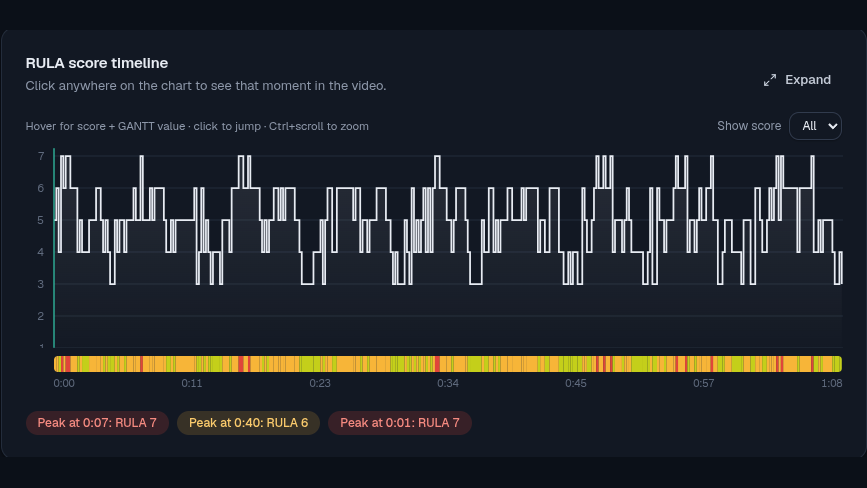
One 62-second clip from a real press station, scored end to end. Each coloured block is one moment. Move across the strip to read any of them.
Five steps your EHS, engineering and continuous-improvement teams can all repeat.
Film a few normal work cycles on a phone, tablet or existing camera. Nothing goes on the operator.
Computer vision finds the body in every frame and measures the joint angles.
Upper arm, lower arm, wrist, neck, trunk and legs, with muscle use and force or load, scored by the RULA rules.
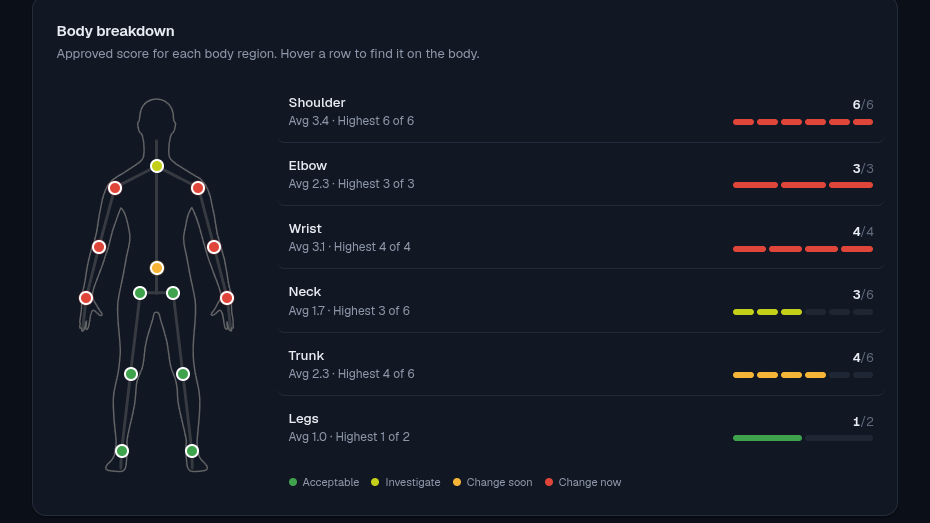
Rotate the 3D body to look at a posture from other angles, including sides the camera did not see. Those views are estimated from your video, so use them to inspect.
Get the action level, the riskiest moments and what to look at first. Film again after the change to show it worked.
Ergomatic is for studying a specific job, on demand. It sits beside your ergonomist and your safety program, not in place of them.
A good first look at one station. One observer samples a few postures, and scores can differ between assessors.
Measure the body part the sensor sits on. Each worker has to be fitted, and the sensors have to be managed.
Watches an area continuously. Cameras have to be placed, set up and kept running.
Study any job when you need to. Film one work cycle on a phone, get every moment scored, then film again after the fix.
The task video with every body segment coloured by its RULA score, beside a live body map and a 3D pose you can rotate. Anyone on the floor can see what drives the risk, and when.
The operator is coloured by RULA risk right on the recording, with a live body map and left and right scores beside it.
A colour-coded timeline marks the riskiest moments. Jump straight to them.
Neck, shoulders, elbows, wrists, trunk and legs, scored left and right, so you know which side is under load.
Rotate and zoom to see the posture from any side. Each segment is coloured by its RULA risk.
Coloured by action level for each second.
Average and highest score, the worst moment, risky postures held too long, and the share of time in each risk band.
Everything you need to find, explain and reduce ergonomic risk, built on computer vision and the established RULA method.
An illustrative example, not a customer result: a light-assembly station where operators fasten components into a housing placed flat on a fixed-height bench.
RULA (Rapid Upper Limb Assessment), developed by McAtamney and Corlett in 1993, scores posture in two groups and combines them with muscle use and force into one grand score from 1 to 7. Ergomatic applies the same method to your task videos.
From automotive assembly to food processing, EHS managers, ergonomists and industrial engineers use Ergomatic to assess the tasks that matter most.
Free, practical guides on RULA, REBA, the NIOSH lifting equation, workstation design and building an industrial ergonomics program.
Score a RULA worksheet step by step and interpret the 1 to 7 action levels on a manufacturing line.
Beginner · 9 min readCompare the most widely used observational methods and learn which to use for each manufacturing task.
Intermediate · 7 min readEvery multiplier, the Lifting Index, a worked manufacturing example and how to redesign high-risk lifts.
Intermediate · 10 min readRecommended work heights, reach zones, parts presentation and sit-stand options.
Beginner · 8 min readThe risk factors behind repetitive strain on paced lines and practical engineering and administrative controls.
Intermediate · 8 min readElimination, substitution, engineering, administrative and PPE, applied to musculoskeletal disorders.
Beginner · 6 min readErgomatic is AI ergonomic risk assessment software for manufacturing. You film one work cycle on a phone, tablet or existing camera and upload it. Ergomatic scores every moment with RULA, shows the riskiest second and names the body segment driving it, so EHS and engineering teams know which job to fix first.
RULA (Rapid Upper Limb Assessment) is an observational method for scoring postural risk to the neck, trunk and upper limbs. It produces a grand score from 1 to 7 and an action level that tells EHS and engineering teams how urgently a task needs to change. It is widely used for assembly, packing, inspection and machine-tending tasks.
Record a few normal work cycles of the task, create an Ergomatic account and upload the video. Computer vision detects body landmarks frame by frame, calculates joint angles for the upper arm, lower arm, wrist, neck, trunk and legs, and applies the RULA scoring rules to each moment.
A few normal work cycles of one operator, filmed on a phone, tablet or existing camera. Keep the operator in frame and the camera steady. A clear view of the whole body gives the most complete score.
No. Ergomatic is markerless. It works from video recorded on a phone, tablet or existing camera. There are no wearables, sensor suits or markers to attach to operators, and no cameras to install.
No. Ergomatic does the measuring, consistently and on every frame. People still decide what to change. Use the result alongside professional judgement, worker feedback and your occupational health program.
A grand score of 1 to 2 is an acceptable posture. 3 to 4 means investigate further. 5 to 6 means investigate and change soon. A score of 7 means change now. Ergomatic shows the score for every moment and marks the worst one.
Yes. Film the task again after the change and compare the new result with the earlier one. Ergomatic supports before and after comparison, so you can show the drop in risk with evidence.
Your video is stored only on Ergomatic servers.
No. RULA is a screening and prioritization tool for ergonomic risk. It helps you decide where to act first and verify that changes reduce exposure. It does not diagnose any person.
Any manufacturing task where posture matters, including automotive and EV assembly, electronics, food and beverage processing, pharma and medical devices, metal fabrication, aerospace, warehousing and logistics, and packaging. It suits assembly, packing, inspection and machine-tending work.
Create an account and start with free initial credits. Upload your first video and read the result. To talk about plans for several lines or sites, email admin@ergomatic.app or call +91 73059 60743.
Film one work cycle on a phone, upload it and read the result. Start with free credits, or talk to us first.